Site Tracker
- 4.6
- Rating
- 10.00K
- Installs
- Free
- Price
 Analysis by App-foxy
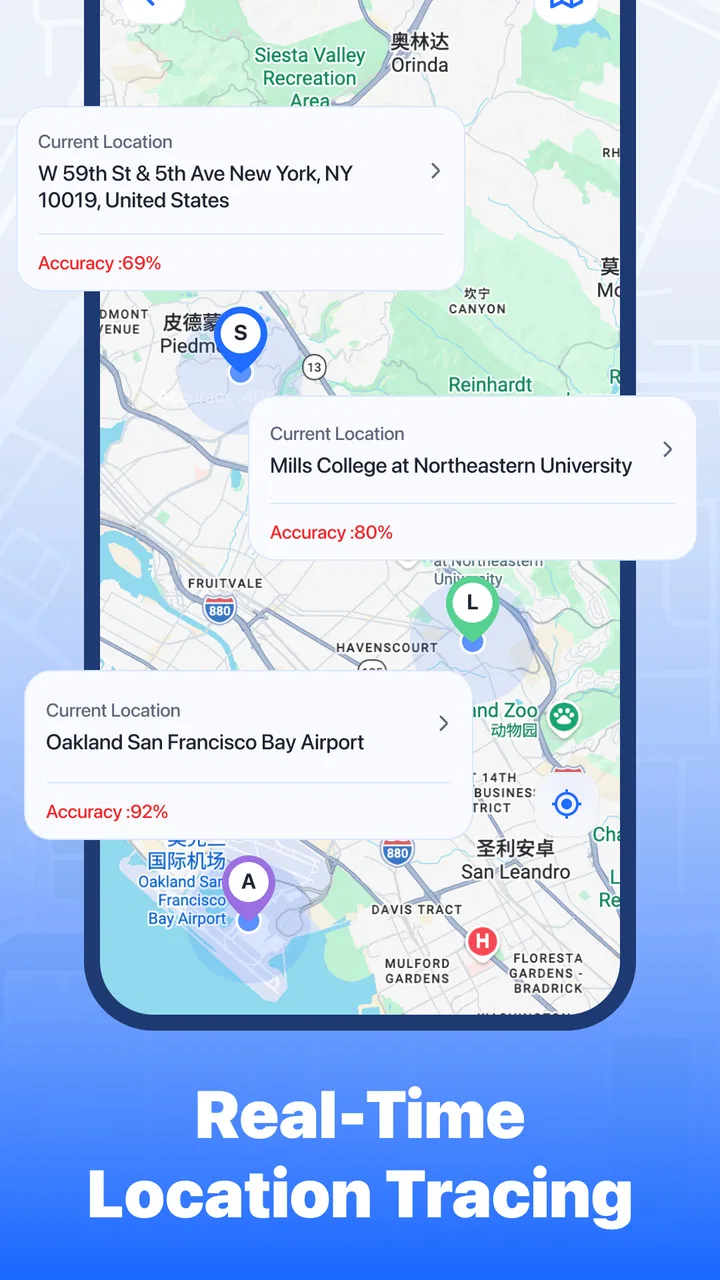
I approached Site Tracker as a practical safety and navigation app rather than as another general-purpose map. Its purpose is straightforward: help trusted friends share their whereabouts in real time and use safety alerts when a situation needs attention. That sounds simple, but location sharing is one of those tasks where small setup mistakes can make the whole experience feel unreliable. My impression is that this app is most useful when everyone agrees in advance on who should see whom, when tracking is appropriate, and what an alert actually means.
It is a free app from Alpha game in the Maps & Navigation category, aimed at everyone. The current version is 1.0.9 and works on devices running Android 8.0 or later. With a 4.6 average from around 182 ratings and over 10K installs, it has attracted a modest but encouraging user base. I would not treat those figures as proof that it will work perfectly on every phone, though. Location tools depend heavily on device settings, network conditions, and how carefully the people in a group complete the initial setup.
Where people usually get stuck
The first point of friction is often not the map itself. It is the relationship between the people using the app. Real-time location tracking only makes sense when the right friends are connected and everyone understands the arrangement. If one person expects continuous visibility while another expects occasional check-ins, the app can appear confusing even when it is behaving normally.
You May Also Like

 Blood Strike: 2.5 Anniversary
Blood Strike’s Loadouts Turn Every Drop Into a Tactical Gamble
A close look at Blood Strike’s custom loadouts: how fast access to signature weapons reshapes its battle royale rhythm, rewards preparation, and narrows the gap between fights.

 Pandora - Music & Podcasts
Pandora’s Music Is Easy to Start, but Harder to Recover
Pandora’s strength is its low-effort path from a seed to a station. Its weak spot is how much confidence it asks you to place in connection, setup, and quiet recovery.

 8 Ball Pool
 Is Built on Rivalries, Rematches, and Routine
A close look at the rivalries, rematches, shared routines, and unanswered safety questions that turn a quick pool match into a persistent mobile community.

 Samsung Music
’s Quiet Strength Is Playing What You Already Own
Its reach comes less from spectacle than from dependable access to a personal library. That simplicity is both the app’s strongest retention engine and its ceiling.

 AccuWeather: Weather Radar
AccuWeather Review: A Quick, Clear Forecast for Everyday Decisions
For everyday plans, the best forecast is the one you can understand quickly. AccuWeather makes rain timing, radar, and local conditions easy to act on, with a few trade-offs.

 Hill Climb Racing
Why Hill Climb Racing Still Turns Crashes Into One More Run
A tiny car, a bumpy hill and one more upgrade: Hill Climb Racing keeps resurfacing because its simple chaos makes every near-miss feel personal.
More From Our News Desk
View All News


I recommend deciding on a small, clearly defined group before exploring the app. For example, a household might use it for a late-night journey, while a group of friends could use it during a hike or a trip through an unfamiliar area. Keeping the group limited makes the map easier to interpret and reduces the chance of sharing a location with someone who does not need it.
A second sticking point is the difference between seeing a recent position and knowing that the person is actively moving. A location display can only be as useful as the phone’s latest successful update. If the other person is underground, inside a building, in a weak-signal area, or has restricted background activity, the position may not change immediately. I would avoid treating a frozen marker as an emergency by itself.
Safety alerts create another possible misunderstanding. An alert should be agreed upon as a signal that needs a response, not as a substitute for a conversation or for emergency services. Before relying on the feature, I would tell the people in the group what I intend to do if an alert appears and how I will confirm that everything is fine.
The most important habit is to test the complete workflow before relying on it. Have one person share a location, have another view it, and then send or trigger the available safety notification in a calm setting. This reveals whether the group is connected correctly and whether everyone recognizes the relevant screen. It is much better to discover confusion at home than during a stressful journey.
Why the first map view can feel misleading
Maps encourage instant confidence. A marker looks precise, so it is tempting to assume that it represents an exact, continuously refreshed position. I treat it more cautiously. The useful question is not simply “Where is my friend?” but “How recent and trustworthy is the information I am seeing?” If the app provides an indication of update status, I would check it rather than relying only on the marker’s placement.
This matters especially around tall buildings, large venues, wooded paths, and roads with poor connectivity. A person may appear to remain in one place while their phone is struggling to send a new position. Conversely, a position may jump when the device receives a delayed update. That is a limitation of mobile location workflows in general, not necessarily a defect unique to Site Tracker.
Setup checks that prevent avoidable problems
I would begin with the simplest possible arrangement: two trusted people, both using compatible devices, both connected to the same intended tracking group. Add more people only after that basic exchange works. A smaller test makes it easier to identify whether the problem belongs to the sender, the viewer, the account connection, or the phone’s location service.
On Android, check that the device’s main location setting is enabled and that Site Tracker is allowed to use location when the app is being used. If the app offers a choice related to background operation, read it carefully and select the option that matches the tracking situation. I would not grant broader access casually, but I also would not expect dependable ongoing updates if the operating system prevents the app from obtaining location when it is not on screen.
Battery-saving controls deserve special attention. Some phones stop or delay background activity to extend battery life, and manufacturers sometimes add their own restrictions on top of Android’s standard settings. If updates stop after the screen has been off for a while, review the phone’s battery controls for Site Tracker. This is a practical troubleshooting step, not a reason to disable every battery safeguard permanently.
Network access is equally important. A phone may know its own position while being unable to send that position to another person. Test once on a reliable Wi-Fi connection and once on mobile data if that reflects how you plan to use the app. A successful Wi-Fi test does not automatically prove that the app will behave the same way on a rural road or in a crowded station.
Both people should also make sure they are looking at the intended profile or group. A surprisingly common source of confusion in shared-location tools is using the wrong invitation, accepting a connection under an unexpected account, or opening an old session. I would remove uncertainty immediately by asking the other person to identify themselves through a separate message before assuming that a displayed name is correct.
Because the app is rated for everyone, its presentation is approachable, but that does not remove the need for a clear consent conversation. Parents, friends, and partners should all understand when tracking is active and who can view the location. The fact that an app makes sharing convenient does not make constant observation appropriate in every relationship.
A setup routine I would actually use
Choose one trusted contact and agree on the purpose of the test, such as checking a journey home.
Confirm that both phones have location and network access enabled, then open the app and complete the connection carefully.
Exchange a short message outside the map so each person knows which profile belongs to the other.
Move a short distance and wait for the map to reflect the change rather than judging the system from a stationary test.
Try the safety-alert workflow and agree on how the recipient should respond.
This routine exposes more useful information than simply opening the map indoors. It tests the part that matters in daily use: whether a person can share, be seen, and communicate a concern without guessing what happened.
Recovering a workflow when updates stop
When a location appears stale, I would troubleshoot from the least disruptive possibility to the most disruptive. First, check whether the other phone has moved into a weak-signal area or lost its network connection. Next, ask the person to open Site Tracker briefly and confirm that the intended sharing session is still active. This can restore clarity without immediately reinstalling anything or changing several settings at once.
If the position still does not refresh, compare the phone’s own map behavior with the shared view. If other navigation apps also struggle to identify the phone’s position, the problem is probably with the device’s location service or surroundings rather than with Site Tracker. If the phone knows where it is but the other participant sees nothing new, then network access, background restrictions, or the sharing connection deserve closer attention.
Restarting the app can be a reasonable next step, especially after switching between networks. I would close it normally, reopen it, and check the group before attempting a full reset. If the issue began after changing battery or privacy settings, reverse only the relevant change and test again. Changing several permissions at once makes it difficult to learn what actually fixed the problem.
Reinstalling should be treated as a last resort rather than a routine solution. It may clear a local problem, but it can also require the sharing relationship to be established again. Before doing it, make sure the people involved know that the connection may need to be recreated. A clean reinstall is most useful when the app itself repeatedly fails to open or behaves inconsistently after simpler checks have been completed.
For safety alerts, use a confirmation habit. If a friend sends an alert during a journey, try the agreed contact method as well as checking the app. If the situation appears genuinely dangerous, do not wait for a map marker to become more precise; contact appropriate local emergency help. Site Tracker can support communication between trusted people, but it should not be treated as a replacement for professional emergency response.
Small habits that make the app more dependable
I would start a tracking session before leaving, not after a problem has already occurred. This gives the group time to notice a missing connection while everyone is still able to talk normally. I would also end a session when it is no longer needed, both to reduce unnecessary sharing and to make the next session easier to understand.
For longer outings, battery planning matters. Real-time location can place additional demands on a phone, particularly when the device is also navigating, taking photos, or searching for a signal. Carrying a charged phone is more useful than assuming the app can compensate for an empty battery. If a person’s phone shuts down, no location-sharing app can continue updating that device.
Another useful practice is to agree on a plain-language check-in rule. For example, the group might decide that a marker that has not changed for a while should prompt a message, not immediate panic. The exact rule should suit the outing and the people involved. This prevents the map from becoming the only source of interpretation.
When the app is not the cause
Location accuracy is affected by the environment. Indoor spaces, underground transport, dense urban blocks, tree cover, and crowded public areas can all make positioning less stable. A delayed or wandering marker does not automatically indicate that Site Tracker has failed. I would compare the result with the phone’s normal navigation behavior before making that judgement.
The operating system can also be the deciding factor. Since the app supports Android 8.0 and later, older compatible phones may have different battery-management behavior from newer devices. Two people can use the same version and still receive different results because their manufacturers handle background activity differently. This is one reason a real-world test on the actual phones matters more than assuming that a feature will behave identically for everyone.
Network congestion is another outside factor. A person may have a signal indicator while data transfer is still slow or intermittent. In that situation, the app may eventually show the correct position but not at the moment the viewer expects. For a journey where timing is critical, I would combine the app with ordinary messages and a previously agreed meeting or check-in plan.
Privacy expectations can also make the app feel wrong even when it works correctly. Someone who dislikes ongoing location sharing may find the experience intrusive, while someone who wants a full travel history may find a focused trusted-friend tool too limited. The right choice depends on the relationship and the purpose. Site Tracker makes the most sense for temporary or practical coordination, not for replacing trust with surveillance.
Compared with a conventional navigation app, its value is the social safety angle rather than route planning. A standard map is usually better when I need directions, traffic context, business information, or a broad search of places. Site Tracker is more relevant when the question is whether a trusted person has arrived, where a small group is during an outing, or how to signal that someone needs attention.
It also differs from simply sending a one-time location message. A single shared pin is quick and often enough for meeting at a café, but it becomes outdated as soon as the person moves. Site Tracker is better suited to a journey where the other person needs ongoing awareness. The trade-off is that it requires more setup, more battery awareness, and clearer consent than sending one location manually.
Large, mature location-sharing platforms may be a better choice for families that need a wide collection of connected services or highly developed account controls. I would choose Site Tracker instead when I want a focused tool for trusted contacts and safety alerts without turning every interaction into a full navigation workflow. Its smaller scope can be an advantage, but users expecting a feature-rich map ecosystem should set their expectations accordingly.
A realistic everyday scenario
Imagine a friend leaving work late and taking an unfamiliar route home. Before leaving, the friend connects with one trusted contact, checks that the phone has adequate battery and network access, and starts sharing. The contact watches for progress without repeatedly calling. If the friend reaches a difficult area or needs attention, the agreed safety-alert process gives the other person a clear reason to make contact.
The important detail is the preparation. The viewer should know when the journey began, the traveler should know who is watching, and both should understand that a delayed marker may reflect signal conditions. If the traveler arrives safely, ending the session avoids leaving an unnecessary location stream active. In this scenario, the app adds reassurance without requiring the viewer to demand constant messages.
My practical verdict
I see Site Tracker as a focused, free option for people who want mutual real-time location sharing and safety alerts among trusted friends. The developer, Alpha game, has kept the premise easy to understand, and the app’s Everyone rating makes it approachable for a broad audience. Its strongest quality is not a collection of elaborate extras; it is the possibility of creating a simple shared safety routine around a journey or outing.
My recommendation comes with a condition: test it before depending on it. Check the connection, confirm the correct people are visible, move through a real environment, and review how the phone handles background location and battery use. Those steps answer the practical questions that a store description cannot answer. They also prevent the common mistake of assuming that an attractive map marker equals a guaranteed live connection.
I would recommend it to friends, families, and small groups who value a direct way to keep track of one another during specific activities. It is particularly suitable when a one-time pin is too limited but a large navigation platform feels excessive. I would skip it if I needed detailed route planning, extensive travel tools, or a system that could replace emergency services and personal communication.
The rating of 4.6 from around 182 ratings suggests that early users have responded positively, while the total of over 10K installs shows that it has reached a meaningful starting audience without making it a universal standard. The app is free, which makes a careful trial easy, but free access should not change the privacy conversation or the need for sensible safety planning.
Overall, I find Site Tracker worthwhile when used deliberately. Start with a trusted pair, establish a clear purpose, test the alert workflow, and treat every displayed position as useful information rather than absolute proof of someone’s exact situation. With those habits, it can be a practical companion for shared journeys. Without them, even a well-designed location app can create false confidence or unnecessary worry.
FAQs for Site Tracker
01What is Site Tracker and what can I use it for?
Site Tracker is designed to help users monitor websites and keep track of changes, updates, availability, or other selected activity, depending on the version and configuration offered by the developer. It can be useful for checking product pages, news sites, project pages, or personal websites without visiting them repeatedly. Before downloading, review the app’s exact tracking features and supported website types.
02How does Site Tracker notify me when a website changes?
After adding a website or page, Site Tracker generally checks it at intervals and compares the latest version with the previous one. When a relevant change is detected, the app may send a notification or display an update inside the application. Results can depend on the checking frequency, internet connection, page structure, and whether the website blocks automated requests or requires a login.
03Is Site Tracker free to download and use?
Site Tracker may be available as a free download, but some features can depend on the app version, subscription plan, advertising model, or in-app purchases. Limits may apply to the number of tracked pages, checking frequency, notification options, or advanced monitoring tools. It is worth checking the current store listing carefully so you understand any costs before adding multiple websites.
04Does Site Tracker require access to my accounts or personal information?
For basic public website monitoring, Site Tracker may only need an internet connection and notification permission. However, certain tracking tasks could require account access, saved credentials, or additional permissions if the app supports private pages or authenticated websites. Always review the privacy policy and permission requests before use, and avoid entering sensitive passwords unless the developer clearly explains how they are protected.
05What should I do if Site Tracker stops detecting updates or sending alerts?
If notifications are delayed or changes are not detected, first check your internet connection, notification permissions, battery-saving restrictions, and background activity settings. Confirm that the tracked page is still available and has not changed its address or access requirements. Some websites also prevent automated monitoring. Updating the app, recreating the tracking entry, or consulting the developer’s support information may resolve the problem.
Pros
- Tracks website uptime and availability from your mobile device.
- Clean dashboard makes monitoring multiple sites easy.
- Sends alerts when a monitored website goes offline.
- Useful response-time data helps identify performance issues.
- Lightweight app with simple setup for quick monitoring.
Cons
- Advanced monitoring options may require a paid plan.
- Alert delivery can depend on reliable internet access.
- Limited tools for diagnosing the exact cause of downtime.
- Monitoring frequency may vary between subscription tiers.
- Not ideal for teams needing detailed reports or collaboration features.

Site Tracker
Gallery